Personalized Lead Outreach: 3-Email Drip
Add leads to a Google Sheet. The workflow researches each person and company, drafts a personal first email, and sends a three-email sequence in one thread. Nothing is sent until someone types "yes".
Status: built in n8n, not yet run on live data. Self-initiated portfolio project.
The problem
Personal outreach works, but researching each lead and writing three emails takes time, so teams either send generic templates or stop after one email.
How it works, in plain words
You a person on your team AI an AI step Auto runs by itself
-
You
Add a lead
Name, email, company and website go into a shared sheet.
-
AI
It researches them
A quick profile of the person and their company, from public sources.
-
AI
It writes a personal email
A short first email based on that research, saved as a draft.
-
You
You say yes
Read it, edit if you like, type “yes”. Nothing is sent without this.
-
Auto
It sends and follows up
Sent from your Gmail. Follow-ups 2 and 3 are drafted for your yes, in the same thread.
- Research each lead by hand, or skip it
- Generic templates
- Follow-ups forgotten after email 1
- Every lead researched before the first email
- Personal drafts, ready for your yes
- Follow-ups drafted on time, in the same thread
See the real build (n8n)
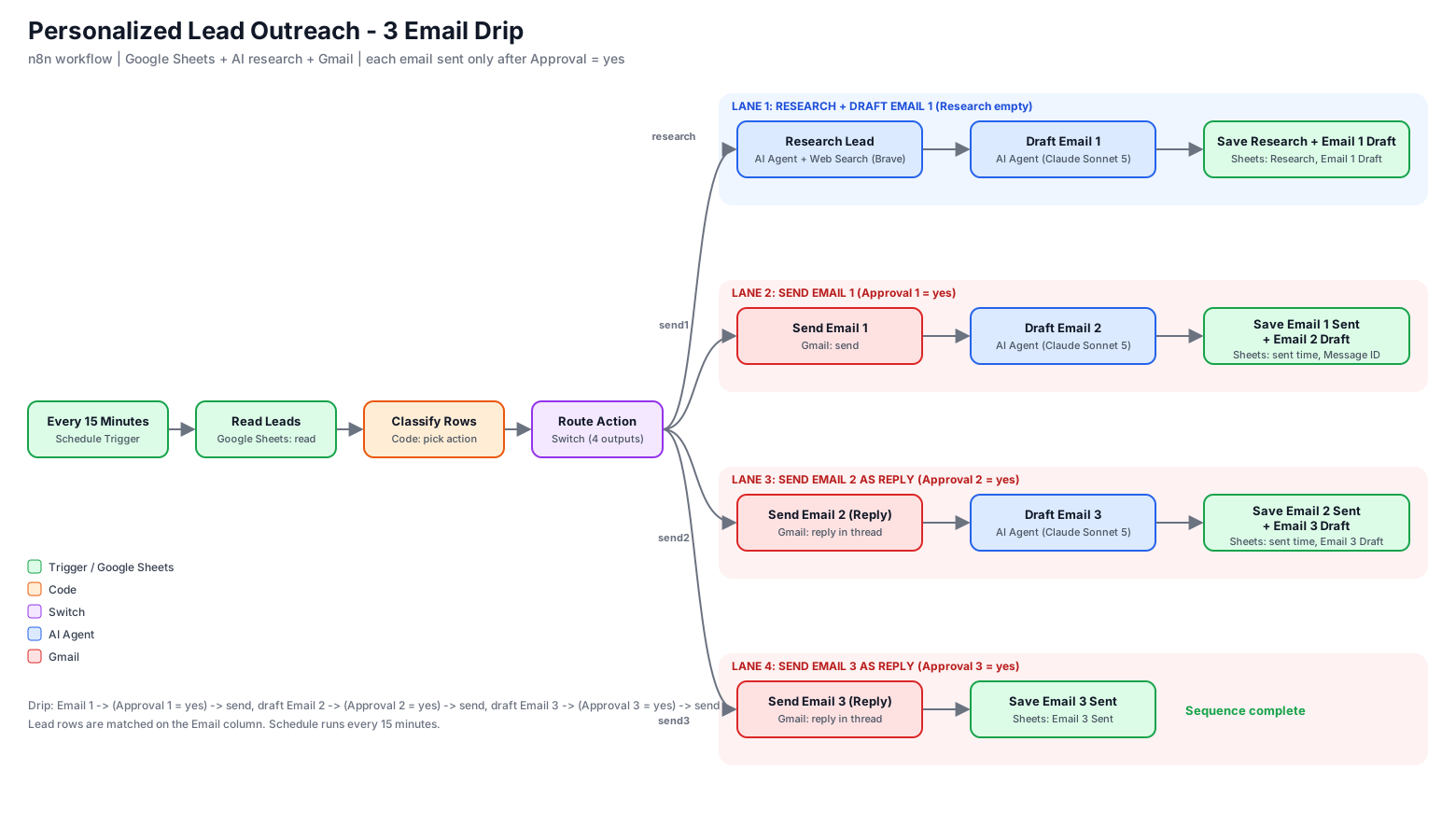
- Every 15 minutes the workflow reads the lead sheet and decides one next action per lead.
- Research: an AI agent runs 2–4 web searches and writes a short profile (max 180 words).
- Email 1: drafted from that research (under 110 words, with a subject line) and saved to the sheet.
- Approve: the owner types
yesin the sheet; the email is sent from Gmail. - Emails 2 and 3: drafted after each send, approved the same way, sent as replies in the same thread.
The sheet is the control panel
One row per lead: name, email, title, company and website. The workflow fills research, drafts and sent timestamps. Approval columns stay in human hands.
Safeguards
- Human approval for every email; the sent text is exactly what's in the cell
- Each email sends once: sent timestamps are written straight after sending
- Follow-ups reply in the same thread, so the lead sees one conversation
- A fallback subject is used if the subject line is edited out
Limits and next steps
- Does not yet detect replies; pause approvals for leads who respond
- Timing between emails is set by when you approve
- Respect sending limits, consent and unsubscribe rules
- Planned: reply detection, minimum delays, status column, "drafts ready" notifications
Outreach that stays personal at scale?
We can adapt this to your CRM, inbox and approval process.