Outbound Email Tracker
Keeps outbound sequences honest. It compares the lead sheet with what actually went out from Gmail, records every step, flags emails that were missed or sent late, asks owners why, and gives the manager a live dashboard and a Monday email.
Status: built in n8n; logic tested with mock data, not yet run against live Gmail or Sheets. The dashboard below uses mock data.
The problem
Sequences are planned at 3–5 emails, but in practice follow-ups slip, go out late or never go out. Managers find out weeks later, if at all.
How it works, in plain words
You a person on your team AI an AI step Auto runs by itself
- You
Plan the sequence
Three to five emails per lead, kept in a simple sheet.
- Auto
It checks what really went out
Compares your Gmail with the plan every 30 minutes.
- Auto
Each email is marked
Sent, sent late (by how many days) or missed.
- You
You explain the gaps
A short form asks for the next date, or the reason for a miss.
- Auto
Managers see it weekly
A live dashboard plus a Monday email.
- Follow-ups slip and nobody notices
- Late or missed emails have no reason attached
- Managers hear about it weeks later
- Every step recorded against the plan
- A reason captured for every miss
- The sequence stops automatically when the lead replies
See the real build (n8n)
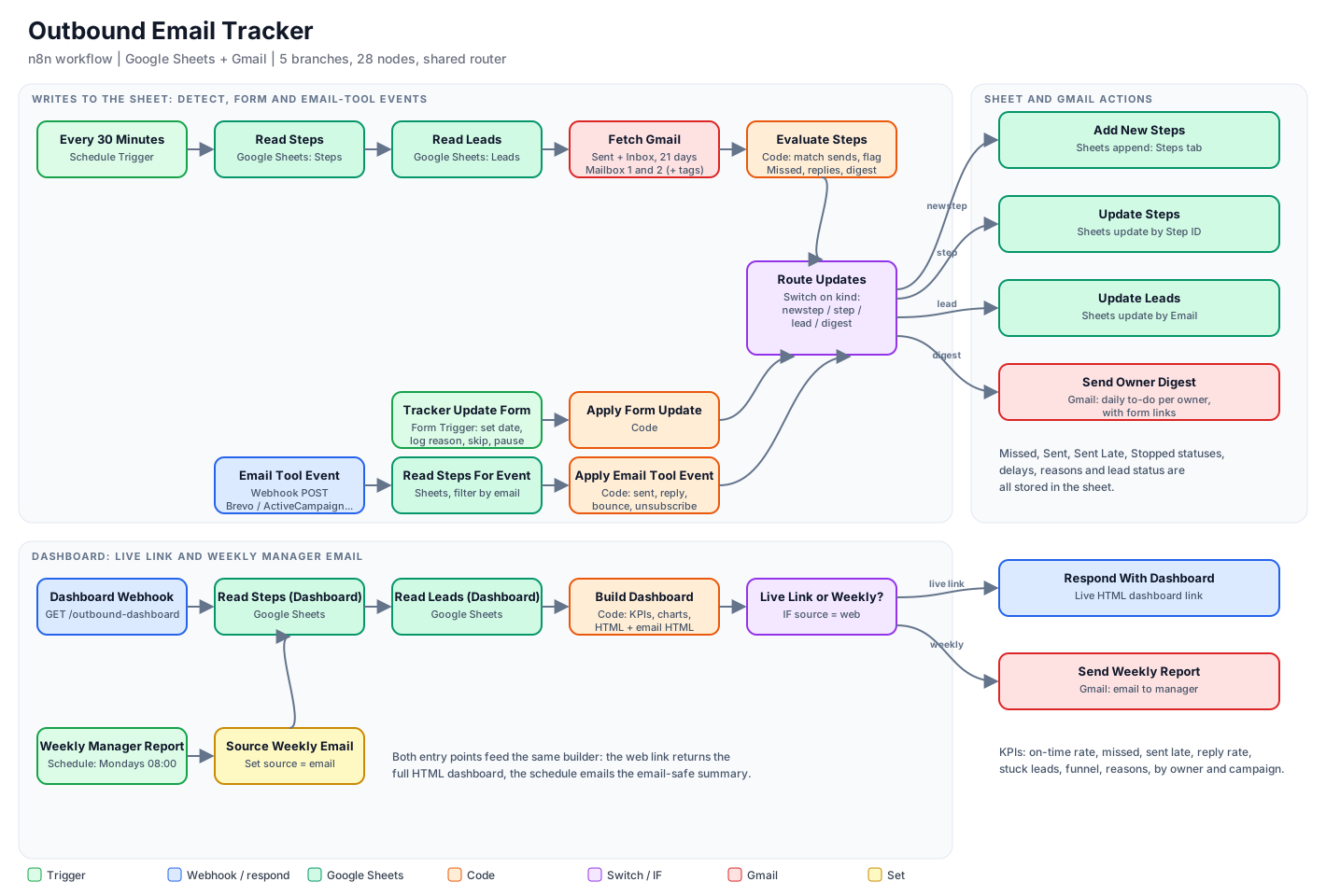
- Tracks a 3–5 email sequence per lead and matches sent emails in Gmail to the next step
- Marks each step Sent, Sent Late (with days of delay) or Missed
- When an email goes out, asks the owner for the next date, or plans it automatically
- Asks for a reason on every miss through a simple form
- Stops the sequence when the lead replies, bounces or unsubscribes
- Accepts events from email tools (Brevo, ActiveCampaign, Mailchimp) through a webhook
The dashboard (sample, mock data)
On-time send rate, missed emails and missing reasons, average delay, reply rate, stuck leads, funnel by email number, 8-week activity, and breakdowns by owner and campaign.
How it's built
One n8n workflow, 28 nodes, five branches (detect, form, email-tool events, live dashboard, weekly email), writing to a two-tab Google Sheet through one shared router. Supports multiple sending mailboxes.
Limits
- Matching is heuristic; a subject filter and start date keep unrelated emails out
- Emails sent by tools from their own servers need the webhook mapping
- The live dashboard needs authentication added before sharing
Know whether your follow-ups actually happen
We can connect this to your inboxes and sequences.