Inbound Lead Response Tracker
Answers one question: are we replying to inbound leads fast enough, and at all? It records every lead, watches Gmail for the first reply, measures it against an SLA, warns owners before a breach, and reports weekly.
Status: built in n8n; logic tested with mock data, not yet run against live Gmail or Sheets. The dashboard below uses mock data.
The problem
A demo request that waits six hours often goes cold. Most small teams don't know their real response time, especially for leads that arrive in the evening.
How it works, in plain words
You a person on your team AI an AI step Auto runs by itself
- Auto
A lead comes in
From your web form, a sheet row, or your enquiry inbox.
- Auto
The clock starts
Every lead gets a reply deadline (4 hours by default).
- Auto
It watches your inbox
Every 15 minutes it looks for your first reply.
- You
You get a nudge
A warning at 75% of the deadline; your manager is told if it's missed.
- Auto
Response time is measured
A live dashboard and a weekly email show how fast you really reply.
- Nobody knows the real response time
- Evening leads wait until morning
- Misses discovered weeks later
- Every first reply is timed
- Warnings before a deadline is missed
- A weekly view of response time by hour, source and owner
See the real build (n8n)
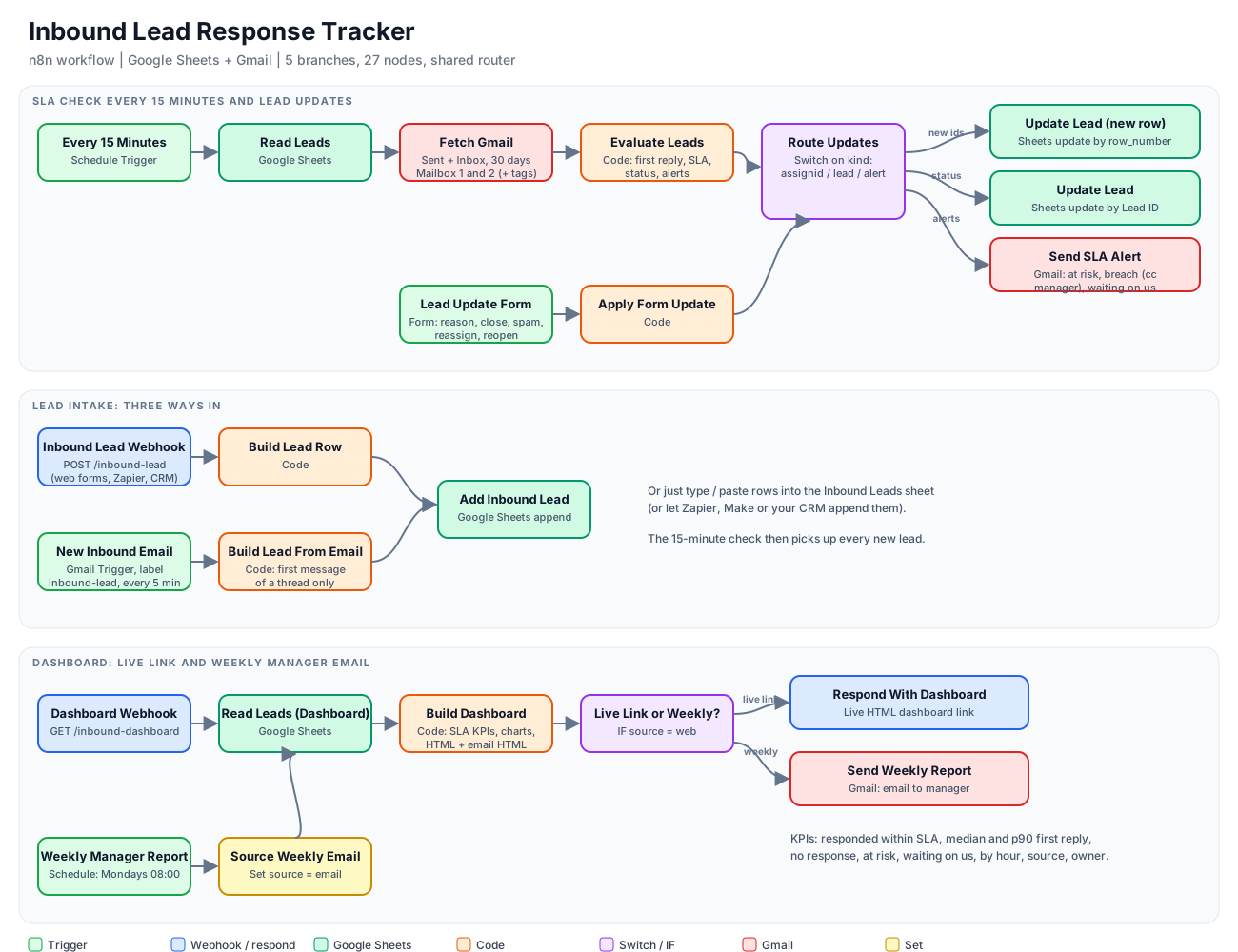
- Three ways in: a sheet row, a webhook from your form, or a Gmail label on your enquiry inbox
- Every 15 minutes it finds your first reply and calculates response minutes against the SLA (default 4 hours, optional business hours)
- Alerts the owner at 75% of the SLA, and the manager on a breach, once each
- Spots leads who wrote back and are still waiting on you
- A form to log reasons, close, mark "not a lead", reassign or reopen
Statuses
| Status | Meaning |
|---|---|
| New | No reply yet, inside the SLA |
| At Risk | 75% of the SLA has passed |
| No Response | SLA breached, no reply |
| Responded / Responded Late | First reply inside / after the SLA |
The dashboard (sample, mock data)
Share answered within SLA, median and p90 first response, breaches, at-risk leads, response time by the hour a lead arrived (shows evening gaps), and breakdowns by source and owner.
Limits
- Only sees replies from connected Gmail mailboxes, not a CRM or helpdesk
- Counts any reply as a response; it doesn't judge the content
- Business-hours mode ignores public holidays
- The live dashboard needs authentication added before sharing
How fast does your team really reply?
We can connect this to your inbox and forms in days, not months.